

In this article you will learn on how to use a Sora watermark remover in one click, without using other complex software's or tool.
Every video generated through Sora comes with a visible OpenAI watermark embedded in the corner. While this serves as attribution, it can make your content look unprofessional, especially when you're trying to use these videos for business presentations, social media content, or creative projects.
That's where a Sora watermark remover comes in: sorawmremover.com
Why You Need a Sora Watermark Remover
The Sora watermark isn't subtle. It sits prominently on your video, and there's no official toggle in OpenAI's interface to disable it—even for paying Pro users.
This creates real problems:
- Professional presentations look unpolished with visible watermarks
- Social media content appears less credible and “cheap”
- Client work can't be delivered with third-party branding
- Film projects and shorts lose their cinematic quality
- Marketing campaigns suffer from reduced trust and engagement
Many creators have tried workarounds—cropping the video, blurring the corner, or using basic editing software. These methods either sacrifice video quality or leave obvious artifacts that look even worse than the original watermark.
A dedicated Sora watermark remover solves this problem instantly.
How to Remove Sora Watermarks Using SoraWM
Our Sora watermark remover uses advanced AI inpainting technology to seamlessly erase the watermark while preserving your video's original quality. Here's how it works:
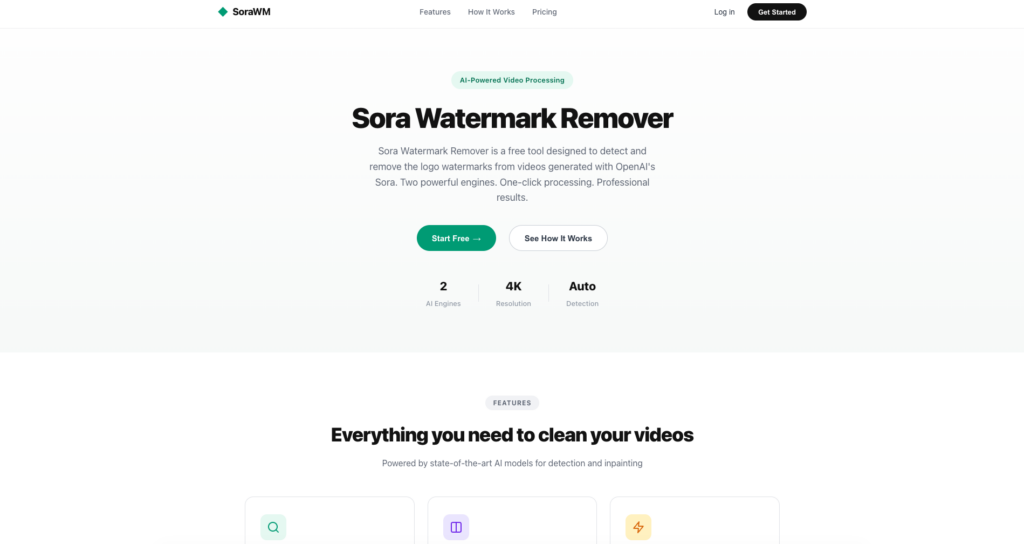
Step 1: Upload Your Sora Video
Navigate to SoraWM Remover and upload your Sora-generated video. You can either:
- Drag and drop the video file directly into the upload area
- Click “Select File” to browse your device
- Paste the Sora video URL if you haven't downloaded it yet
The tool accepts all standard video formats and resolutions that Sora outputs.
Step 2: Let the AI Process Your Video
Once uploaded, our AI automatically:
- Detects the watermark location and pattern
- Analyzes the surrounding pixels, textures, and motion
- Reconstructs the watermarked area using intelligent inpainting
- Renders a clean version without quality loss
This typically takes between 30 seconds to 2 minutes depending on your video's length and resolution.
Step 3: Download Your Clean Video
When processing completes, you'll see a preview of your watermark-free video. Simply click Download to save the clean version to your device.
That's it—three steps to professional, watermark-free Sora videos.
Why SoraWM is the Best Sora Watermark Remover
AI-Powered Precision
Unlike basic editors that blur or crop, our tool uses AI inpainting trained specifically on Sora's watermark patterns. It reconstructs the underlying video content pixel-by-pixel, maintaining textures, motion blur, and grain.
Zero Quality Loss
Generic watermark removers often leave behind artifacts—smudges, blur, or unnatural patches. SoraWM preserves your video's full resolution and detail. The result is indistinguishable from a native watermark-free export.
No Signup Required
Start removing watermarks immediately. No email registration, no account creation, no credit card. Just upload and process.
100% Free
Remove Sora watermarks without paying a cent. No hidden fees, no “premium” upsells for basic features, no ads interrupting your workflow.
Browser-Based
Works directly in your browser on any device—Windows, Mac, iPhone, Android, or Linux. No software to download or install.
Privacy-First
Your videos are processed securely and automatically deleted after you download. We don't store, share, or analyze your content.
Sora Watermark Remover vs. Manual Editing
Some users attempt to remove Sora watermarks manually using tools like Photoshop, After Effects, or DaVinci Resolve. Here's why that approach falls short:
| Method | Time Required | Quality | Skill Level |
|---|---|---|---|
| SoraWM | 30 seconds | Perfect | None |
| After Effects | 1-3 hours | Variable | Expert |
| Photoshop (frame-by-frame) | 5+ hours | Poor | Advanced |
| Cropping | 1 minute | Loses content | Basic |
| Blurring | 5 minutes | Obvious artifact | Basic |
Manual methods require frame-by-frame editing for video content, expert knowledge of masking and tracking, and still often produce visible artifacts. A purpose-built Sora watermark cleaner eliminates all of this friction.
Is It Legal to Remove Sora Watermarks?
This is a common concern. Here's the straightforward answer:
For personal projects and content you own: Removing watermarks for your own use is generally acceptable. You generated the video, you own the creative output.
For commercial use: Review OpenAI's terms of service regarding Sora-generated content. In most cases, you retain rights to videos you create.
For content you don't own: Never remove watermarks from videos created by others. This violates copyright and could have legal consequences.
SoraWM is designed for creators who want to polish their own work—not for removing attribution from others' content. Use the tool ethically and responsibly.
Common Questions About Sora Watermark Removal
Does it work with Sora 2 watermarks?
Yes. Our AI is continuously updated to detect and remove the latest Sora watermark patterns, including Sora 2 and any future versions.
What video formats are supported?
We support MP4, MOV, WebM, and all standard formats that Sora exports. Both landscape (16:9) and portrait (9:16) aspect ratios work perfectly.
Is there a video length limit?
The free version handles videos up to 60 seconds—which covers all current Sora generation limits.
Can I process multiple videos?
Yes. Process as many videos as you need with no daily limits.
What about the invisible C2PA watermark?
Sora embeds both a visible watermark and invisible C2PA metadata for content provenance. Our tool removes the visible watermark. The invisible metadata remains intact for authenticity verification.
Start Removing Sora Watermarks Now
Stop letting watermarks diminish your AI-generated videos. Whether you're a content creator, marketer, student, or filmmaker, clean videos make a better impression.
Remove Your Sora Watermark Free →
Upload your video, wait a few seconds, and download professional results. No signup. No payment. No hassle.

As one of the co-founders of Codeless, I bring to the table expertise in developing WordPress and web applications, as well as a track record of effectively managing hosting and servers. My passion for acquiring knowledge and my enthusiasm for constructing and testing novel technologies drive me to constantly innovate and improve.
Expertise:
Web Development,
Web Design,
Linux System Administration,
SEO
Experience:
15 years of experience in Web Development by developing and designing some of the most popular WordPress Themes like Specular, Tower, and Folie.
Education:
I have a degree in Engineering Physics and MSC in Material Science and Opto Electronics.




Comments