
- What Are AI-Generated Images?
- How to Detect AI Photos by Looking at Visual Details
- AI-Generated Images Often Struggle With Text
- Check Lighting, Shadows, and Reflections
- Use Reverse Image Search to Verify the Source
- Check Image Metadata and Content Credentials
- AI Watermarks and Detection Tools
- Can AI Image Detectors Identify Fake AI Pictures?
- Free Tool to Check AI Photos: PhotoDetector.ai
- How to Detect AI Photos on Social Media
- Signs an Image May Be AI-Generated
- Final Thoughts
The ability to detect AI photos or images is rapidly evolving into a critical skill, especially as technology advances in sophistication and accessibility.
Some AI photos are harmless creative experiments. Others are used in fake news, social media scams, product manipulation, deepfakes, and misleading ads.
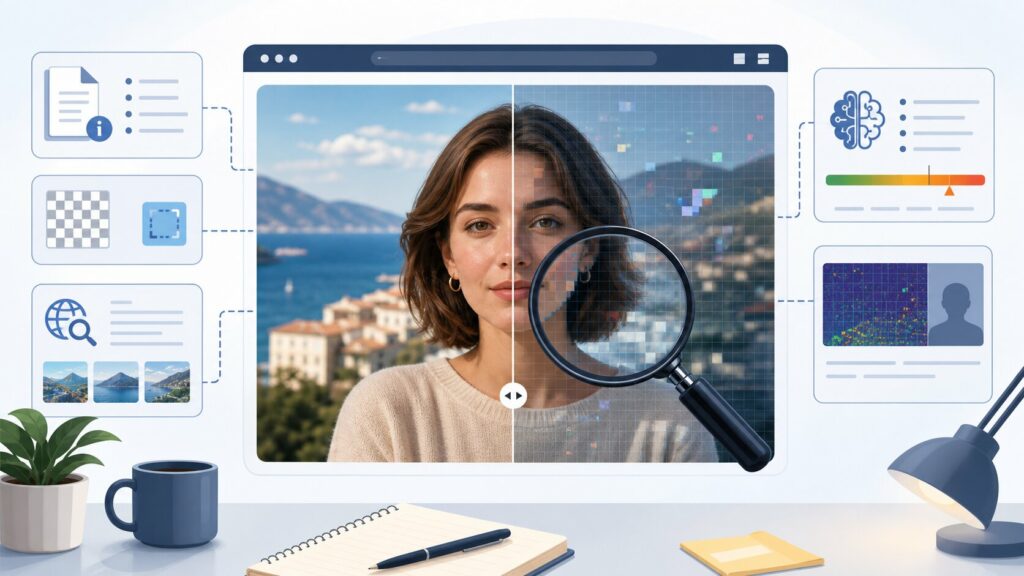
The difficult part is that there is no single perfect test. A fake AI picture may pass one detector and fail another.
The best approach is to combine visual inspection, metadata checks, reverse image search, watermark verification, AI photo detector tools, and common sense about the source.
What Are AI-Generated Images?
AI generated images are visuals created or modified by artificial intelligence models. These tools can turn a text prompt, sketch, reference image, or editing instruction into a realistic-looking picture.
Most modern AI image generation tools use diffusion models or similar generative AI systems. They learn visual patterns from large datasets and create new images based on what the user requests.
For example, someone can type “a realistic photo of a businesswoman standing in a futuristic office” and receive an image that looks like a camera shot. In reality, no camera, model, or office may have existed.
This is useful for design, marketing, concept art, and web content. But it also makes it harder to separate authentic photos from synthetic media.
If you work with AI content regularly, Codeless has related guides on best photo AI detectors, AI SEO content generators, and how to use ChatGPT effectively.
How to Detect AI Photos by Looking at Visual Details
The first step is simple: zoom in. AI-generated photos often look convincing at normal size but reveal problems when inspected closely.
Many synthetic images are strong in overall composition but weak in small details. Faces, hands, background objects, and reflections are good places to start.
Check Hands, Teeth, Ears, and Eyes
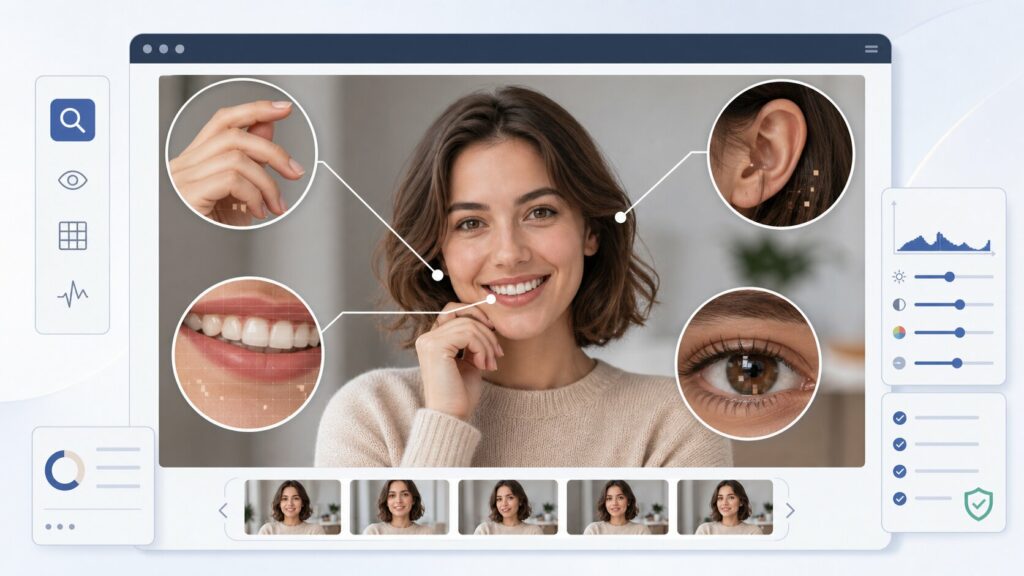
Older AI image generators were famous for broken hands, extra fingers, strange teeth, and mismatched eyes. Newer models are better, but small anatomy mistakes still appear.
- Fingers blending together
- Uneven pupils or odd eye reflections
- Earrings that do not match
- Teeth that merge into one smooth shape
- Glasses that bend incorrectly around the face
- Hair strands that melt into skin, clothing, or the background
A single flaw does not prove the image is fake. Several anatomy problems together are a stronger warning sign.
Look for Strange Background Objects

AI image generation models are good at style but weaker at functional details. Background objects may look normal at first and strange when you inspect them.
- Books with unreadable titles
- Clocks with impossible numbers
- Signs with broken text
- Chairs with missing legs
- Reflections that show the wrong scene
- Tools, buttons, or devices that have no real function
This happens because generative AI predicts visual patterns. It does not always understand how real-world objects should work.
AI-Generated Images Often Struggle With Text
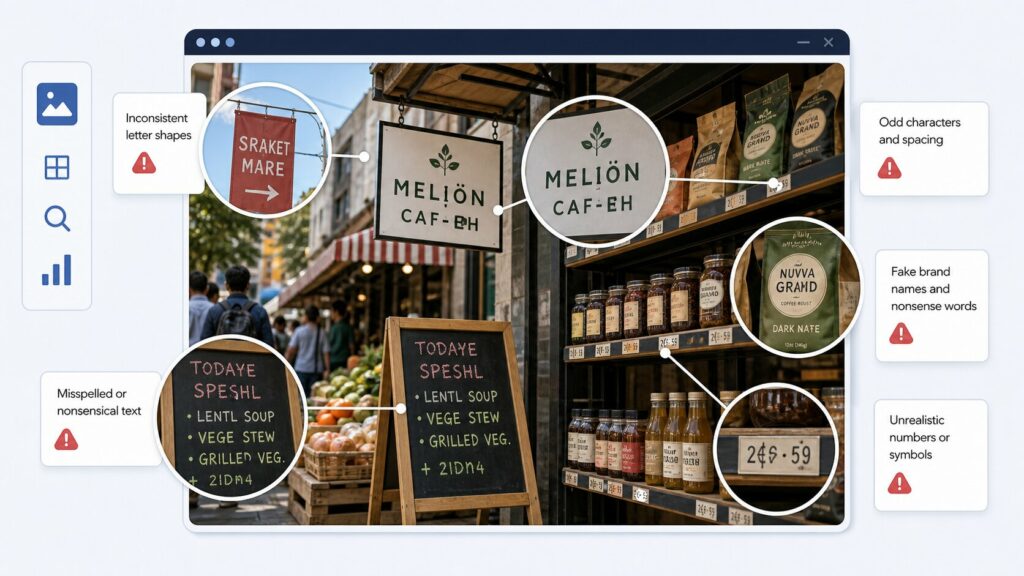
Text is one of the easiest ways to identify fake AI pictures. Many AI tools now produce better typography, but errors still appear.
Check posters, product labels, street signs, screenshots, menus, packaging, and logos. These areas often reveal whether an image is real or AI-generated.
- Misspelled brand names
- Fake-looking logos
- Letters that change shape inside a word
- Repeated symbols
- Text that looks decorative instead of readable
- Inconsistent fonts on the same object
If the image claims to show a real event, product, document, or public sign, unreadable text should make you pause. Verify the source before trusting it.
Check Lighting, Shadows, and Reflections
Real photos obey physical rules. AI-generated images often imitate those rules without fully understanding them.
Lighting, shadows, mirrors, glass, and water are useful places to inspect. These details can expose problems that are easy to miss at first glance.
Shadows and Light Direction
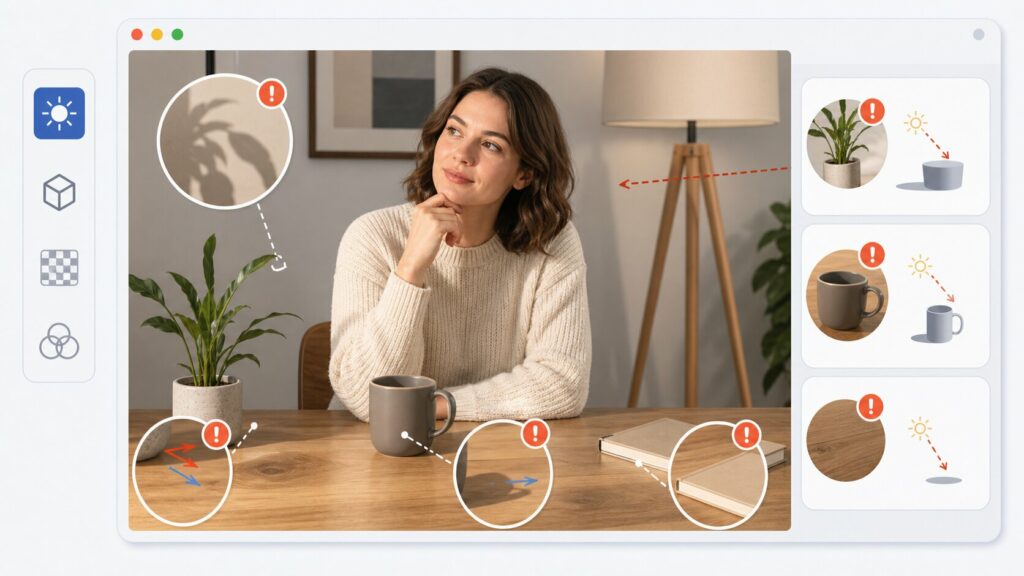
Ask where the light is coming from. If the face is lit from the left but the shadow falls in the wrong direction, something may be off.
Also compare people and objects in the same image. If each one seems lit by a different source, the photo may be synthetic or heavily edited.
Mirrors, Glass, and Water

Reflections are another weak point. In fake AI photos, mirrors may show missing people, wrong clothing, or objects that do not exist in the main scene.
Water reflections may look beautiful but physically impossible. Glass surfaces may show distorted shapes that do not match the room.
A research guide on distinguishing AI-generated images from real photographs groups many clues into anatomy, style, function, physics, and social-context errors. You can read the paper on arXiv.
Use Reverse Image Search to Verify the Source
Reverse image search helps you find where an image first appeared online. This is useful because many AI photos go viral without context.
- Google Lens
- TinEye
- Bing Visual Search
- Yandex Images
If the image appears only on recent social media posts or low-quality websites, be careful. A real photo usually has a stronger source trail.
Look for the original photographer, official brand page, news source, or archive. Reverse image search can also reveal whether the image is a modified version of a real photo.
Check Image Metadata and Content Credentials
Metadata can include camera model, lens, timestamp, editing software, GPS data, and export history. This information is often called EXIF data.
Many platforms remove metadata, so missing data does not prove an image is AI-generated. Still, when metadata exists, it can be helpful.
- Camera information
- Editing software
- Creation date
- Export tool
- AI software references
- Missing or suspicious EXIF data
A growing standard called Content Credentials, developed by C2PA, works like a digital provenance label for media. It can show how an image was created or edited when supported by the creator, software, and platform.
You can learn more from the official C2PA website.
AI Watermarks and Detection Tools
Some AI tools add visible or invisible watermarks. These marks can help identify AI-generated content, but they are not universal.
Google’s SynthID, for example, is designed to watermark and identify AI-generated content from Google AI products. You can learn more from Google DeepMind’s SynthID page.
Watermarks are helpful, but they can sometimes be cropped, compressed, removed, or lost during reposting. An AI-generated image may also have no visible watermark at all.
Codeless also covers related watermark topics, including how to remove Gemini watermark from images and Sora watermark remover. These guides help explain how visible AI labels can be handled online.
Can AI Image Detectors Identify Fake AI Pictures?
AI image detectors analyze patterns in pixels, compression, texture, noise, and model-specific artifacts. They can be useful when checking suspicious images quickly.
However, they should not be treated as final proof. AI image detection tools can produce false positives and false negatives.
- The image was compressed by social media
- The photo was edited after generation
- The AI model is newer than the detector’s training data
- The image combines real and AI-generated elements
- A real photo has heavy filters or retouching
Use AI detection tools as one signal. Do not use them as the whole decision.
Free Tool to Check AI Photos: PhotoDetector.ai
One free tool you can use to check suspicious images is PhotoDetector.ai. It is designed to analyze whether a photo may be AI-generated or real.
This makes it useful for a quick first check before publishing, sharing, or trusting an image online. You simply upload the image and review the result.
Like all AI photo detection tools, PhotoDetector.ai should not be treated as 100% proof. The best method is still to combine the tool’s result with visual inspection, reverse image search, metadata review, and source verification.
This is especially helpful when checking AI-generated images from social media, product listings, profile photos, news posts, or marketing visuals created with AI image generation tools.
Social platforms are where fake AI photos spread fastest. Before sharing a suspicious image, check the account, caption, and context around the post.
- Who posted it first?
- Is the account verified or known?
- Does the caption make an extreme claim?
- Are reliable outlets reporting the same event?
- Do comments mention AI generation?
- Does the image include impossible details?
- Is there a source, photographer, or original file?
For breaking news, political images, celebrity photos, disasters, protests, or product launches, wait for confirmation. Trusted sources matter more than viral speed.
Signs an Image May Be AI-Generated
Here is a quick checklist you can use when trying to identify AI-generated photos. The more signals you find, the more skeptical you should be.
- Unnatural hands, eyes, teeth, or ears
- Strange reflections or shadows
- Broken text on signs or packaging
- Overly smooth skin or plastic textures
- Background objects that do not make sense
- Clothing patterns that merge incorrectly
- Jewelry or accessories that change shape
- Missing metadata or suspicious editing history
- No original source
- AI detector gives a high synthetic-media score
Final Thoughts
To detect AI photos accurately, do not rely on only one clue. The strongest method combines visual analysis, source verification, reverse image search, metadata review, AI watermark checks, and detector tools.
AI-generated images will keep improving. The goal is not to spot every fake by eye, but to build a habit of verification.
Ask where the image came from, whether the details make sense, and whether independent sources support what the image claims to show.

As one of the co-founders of Codeless, I bring to the table expertise in developing WordPress and web applications, as well as a track record of effectively managing hosting and servers. My passion for acquiring knowledge and my enthusiasm for constructing and testing novel technologies drive me to constantly innovate and improve.
Expertise:
Web Development,
Web Design,
Linux System Administration,
SEO
Experience:
15 years of experience in Web Development by developing and designing some of the most popular WordPress Themes like Specular, Tower, and Folie.
Education:
I have a degree in Engineering Physics and MSC in Material Science and Opto Electronics.



Comments