

- Why AI Writing Sounds Like AI
- Common Signs of AI-Generated Content
- How to Make AI Writing Sound Human
- Before and After Example
- How to Humanize AI Text Step by Step
- Use GPThumanizer.io to Make AI Text Sound More Natural
- Best Prompts to Make AI Not Sound Like AI
- What Not to Do When Humanizing AI Text
- Conclusion
- FAQs
Learning how to make AI not sound like AI is mostly about editing for clarity, rhythm, personality, and real human intent. AI-generated content often sounds polished, but it can also feel generic, repetitive, overly formal, and emotionally flat.
The goal is not to hide low-quality AI writing. The goal is to turn a robotic draft into useful, natural, trustworthy content that sounds like it was written for a real reader.
If you use AI tools for writing, you may also like our guides on best AI humanizer tools.
Why AI Writing Sounds Like AI
AI writing often sounds artificial because it tries to be safe, balanced, and complete. This creates content that is grammatically correct but not very memorable.
Common signs include repeated sentence patterns, too many transitions, vague advice, and phrases like “in today’s digital landscape.” These signals make the text feel like a template instead of a real explanation.
Common Signs of AI-Generated Content
Before you can humanize AI text, you need to know what makes it sound robotic. Most AI-generated writing has a few recognizable patterns.
- Generic introductions
- Overuse of words like “leverage,” “delve,” “robust,” and “seamless”
- Similar sentence length across paragraphs
- Too many obvious transitions
- No personal experience or opinion
- Vague examples instead of specific ones
- Perfect grammar but weak voice
- Repetitive summaries at the end of every section
The more of these patterns you see, the more editing the draft needs. A good humanized version should feel useful, specific, and natural.
How to Make AI Writing Sound Human
The best way to make AI writing sound human is to edit it like a person with taste, context, and judgment. Do not only replace words with synonyms.
You need to improve the structure, remove filler, add real examples, and make the tone match your audience. This is what separates humanized AI content from simple paraphrasing.
1. Rewrite the Introduction
AI introductions often start too broadly. They explain the obvious before getting to the point.
A better introduction should answer the reader’s question quickly. Start with the problem, the promise, or the practical result.
Instead of saying “AI has transformed the way we create content,” say what the reader actually cares about. For example: “AI drafts are fast, but most of them need editing before they sound like a real person wrote them.”
2. Use Shorter, More Natural Sentences
AI tends to write long, balanced sentences. Human writing usually has more variation.
Mix short and medium sentences. Break up dense paragraphs and remove phrases that do not add meaning.
This makes the content easier to read. It also gives the writing a more natural rhythm.
3. Remove Generic AI Phrases
Some phrases instantly make content sound AI-generated. They are not always wrong, but they are often overused.
- In today’s fast-paced world
- It is important to note
- Delve into
- Unlock the power of
- Game-changer
- Seamless experience
- Robust solution
- Elevate your strategy
Replace these with plain language. The more specific your wording is, the less robotic the article will feel.
4. Add Real Examples
AI often gives advice without showing what it looks like in practice. Examples make the writing more credible.
If the article is about SEO, include a sample title, keyword, or content structure. If it is about email marketing, include a short email example.
Specific examples help readers trust the content. They also make the text harder to confuse with generic AI output.
5. Add Opinion and Judgment
AI writing often avoids taking a position. It presents every option as equally good.
Human writing usually has judgment. It says what matters, what does not, and what the reader should do next.
For example, do not only say “both tools have advantages.” Say which one is better for beginners, which one is better for teams, and why.
6. Match the Tone to the Reader
AI often writes in a neutral tone. That can be fine for documentation, but it can feel lifeless in blog posts, reviews, emails, and landing pages.
Think about who will read the content. A startup founder, student, developer, and ecommerce owner do not need the same tone.
Use the vocabulary your reader would use. Good humanized AI writing sounds like it belongs in the reader’s world.
7. Add Human Transitions
AI transitions can sound too obvious. Words like “Furthermore,” “Moreover,” and “In conclusion” often make the article feel academic.
Use simpler transitions instead. Phrases like “Here is the problem,” “That sounds good, but,” or “The better approach is” feel more conversational.
8. Edit for Meaning, Not Just Detection
Many people try to humanize AI text only to pass AI detectors. That is the wrong goal.
AI detectors are imperfect, and rewriting only for detection can make content worse. Focus on making the article more helpful, accurate, and original.
Google’s official guidance says its ranking systems aim to reward helpful, reliable, people-first content, regardless of whether AI helped create it. You can read the guidance on Google Search Central.
Before and After Example
Here is a simple example of AI-sounding text and a more natural rewrite. Notice that the rewrite is clearer and more direct.
AI-Sounding Version
In today’s digital landscape, businesses must leverage innovative strategies to enhance their content creation process and ensure that their messaging resonates with their target audience.
Humanized Version
Most AI drafts are usable, but they rarely feel finished. You still need to edit the tone, add examples, and make the writing sound like it came from your brand.
The second version is not fancy. It is just clearer, more specific, and closer to how a real person would explain the idea.
How to Humanize AI Text Step by Step
Humanizing AI content is easier when you follow a simple process. Do not try to fix everything in one pass.
- Read the draft and remove obvious filler.
- Rewrite the introduction so it gets to the point faster.
- Break long paragraphs into shorter ones.
- Replace generic AI phrases with plain language.
- Add examples, opinions, and specific details.
- Check facts, links, and claims.
- Read the article out loud and fix awkward sentences.
- Use a humanizer tool only after you understand what needs improvement.
This process works for blog posts, product descriptions, emails, essays, social captions, and landing pages. The main idea is always the same: keep the useful parts and remove the robotic parts.
If your draft was generated with Claude, follow our guide on how to humanize Claude content. It covers an open-source editing skill, an online option, and the distinction between improving readability and removing text watermarks.
Use GPThumanizer.io to Make AI Text Sound More Natural
GPThumanizer.io is a free AI humanizer tool that can help make AI-generated text sound more natural. It is useful when your draft feels too robotic, too formal, or too obviously written by ChatGPT.
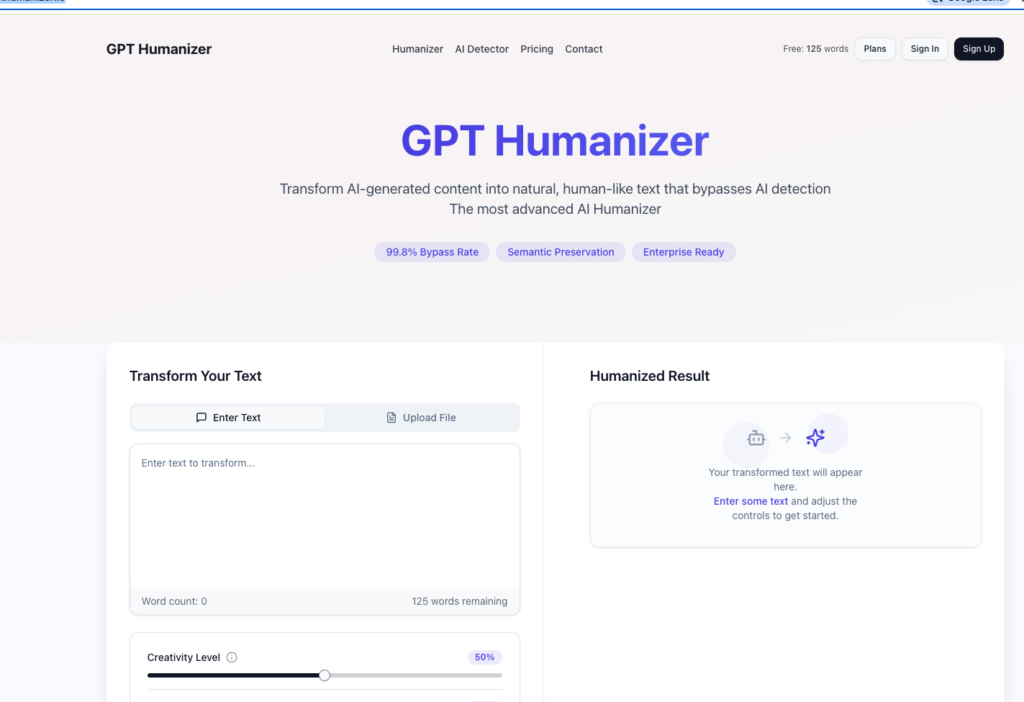
The tool is simple: paste your AI-generated content, run the humanizer, and review the rewritten version. It can save time when you need a faster way to humanize AI text before doing your final edit.
How to Use GPThumanizer.io
Using GPThumanizer.io is straightforward. You do not need a complicated workflow.
- Copy the AI-generated text you want to improve.
- Paste it into GPThumanizer.io.
- Click the humanize button.
- Read the new version carefully.
- Edit the output so it matches your brand voice.
- Check facts, grammar, and formatting before publishing.
The last step is important. A humanizer can improve the style, but you should still review the content yourself.
When GPThumanizer.io Is Useful
GPThumanizer.io is useful when you already have a decent AI draft but the tone feels stiff. It can help rewrite the text into something more readable and natural.
- Blog post drafts
- Email copy
- Product descriptions
- Social media captions
- Short essays
- Website copy
- AI-generated summaries
It works best when the original draft has a clear idea. If the AI text is inaccurate or empty, humanizing it will not fix the core problem.
What to Check After Using an AI Humanizer
After using any AI humanizer, always review the output. The text may sound better, but it can still lose nuance or change the original meaning.
- Does the meaning stay the same?
- Are all facts still correct?
- Does the tone match your audience?
- Are there awkward rewritten phrases?
- Does the article still have a clear structure?
- Does it include original examples or insights?
This is where human editing matters. A tool can help rewrite, but your judgment makes the content publishable.
Best Prompts to Make AI Not Sound Like AI
You can also improve the original AI output by giving better prompts. A strong prompt reduces the amount of editing needed later.
Here are a few prompt examples you can use before sending text to a humanizer tool.
- Write in a clear, natural tone for beginners. Avoid corporate language and generic AI phrases.
- Use short paragraphs, specific examples, and plain English.
- Rewrite this text so it sounds like a helpful human editor wrote it.
- Remove filler, repetition, and vague claims from this draft.
- Make this sound more conversational without making it casual or unprofessional.
The better your prompt, the better your first draft. The humanizer should be a finishing tool, not the only editing step.
What Not to Do When Humanizing AI Text
Humanizing AI writing does not mean making the content misleading. It should improve readability, not hide dishonesty.
- Do not publish unchecked AI facts.
- Do not use humanizers to fake personal experience.
- Do not submit AI work where it is not allowed.
- Do not remove important disclosures when transparency is required.
- Do not rewrite so aggressively that the meaning changes.
The safest approach is to use AI as an assistant. Your own knowledge, editing, examples, and responsibility should still guide the final content.
Conclusion
To make AI not sound like AI, focus on clarity, rhythm, examples, tone, and real editorial judgment. Remove generic phrases, add specifics, and rewrite sections that feel too polished or empty.
GPThumanizer.io can make this process faster by turning stiff AI-generated text into a more natural draft. Still, the best results come when you combine the tool with your own editing and fact-checking.
AI can help you write faster, but the final version should still feel useful, accurate, and human. That is what readers and search engines both reward.
FAQs
How do I make AI not sound like AI?
Rewrite the introduction, remove generic phrases, add real examples, and vary sentence length. You can also use an AI humanizer like GPThumanizer.io to make the draft sound more natural.
Why does ChatGPT writing sound robotic?
ChatGPT often sounds robotic because it uses balanced sentences, safe wording, and generic explanations. Without editing, the output can feel polished but impersonal.
Is GPThumanizer.io free?
GPThumanizer.io offers a free way to humanize AI-generated text. It is useful for quickly improving the tone of AI drafts.
Can AI humanizers guarantee original content?
No. AI humanizers can rewrite text, but they cannot guarantee originality, accuracy, or quality.
You should still review the content, add your own ideas, and check all claims before publishing.
Should I use an AI humanizer for SEO content?
You can use an AI humanizer to improve readability, but SEO content still needs helpful information, search intent alignment, internal links, and original value. Humanizing the text is only one part of the editing process.

As one of the co-founders of Codeless, I bring to the table expertise in developing WordPress and web applications, as well as a track record of effectively managing hosting and servers. My passion for acquiring knowledge and my enthusiasm for constructing and testing novel technologies drive me to constantly innovate and improve.
Expertise:
Web Development,
Web Design,
Linux System Administration,
SEO
Experience:
15 years of experience in Web Development by developing and designing some of the most popular WordPress Themes like Specular, Tower, and Folie.
Education:
I have a degree in Engineering Physics and MSC in Material Science and Opto Electronics.

Comments