

JXL is a newer image format designed to improve on JPEG with smaller files and better image quality called also JPEG XL. It offers a promising upgrade for photographers, website owners, and anyone managing a large image collection.
However, switching formats should be a measured decision. JPEG XL can improve your image workflow, but you need to check compatibility and choose the right conversion method before replacing existing files.
What Is JXL (JPEG XL)?
JPEG XL (JXL) is an image coding standard identified as ISO/IEC 18181, with files typically using the .jxl extension. It supports both lossy and lossless compression, allowing users to prioritize smaller files or exact preservation of image data.
According to the official JPEG XL overview, the format supports transparency, animation, progressive decoding, high bit depth, wide color gamut, and high dynamic range. It also provides a reversible way to recompress existing JPEG files.
Why Consider Moving to JPEG XL?
1. More Efficient Image Storage
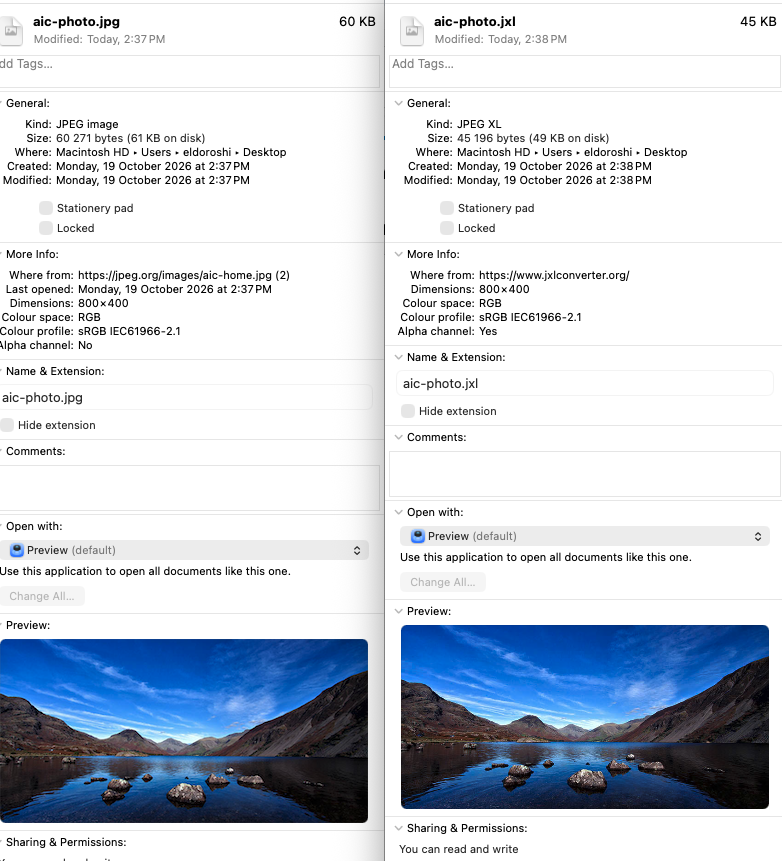
JPEG XL is designed to deliver better compression efficiency than traditional JPEG. Depending on the image and encoding settings, this can mean smaller files at comparable visual quality.
JXL has also reached an important milestone: Google has announced native JPEG XL decoding support starting with Chrome 155. This allows supported Chrome versions to display JXL images directly, making the format more practical for websites while older browsers still need a fallback.
Actual savings vary, so test a representative selection before converting an entire library. Include detailed photographs, gradients, screenshots, and images that are already heavily compressed.
2. Reversible Conversion of Existing JPEGs
One distinctive feature is lossless JPEG recompression. With an appropriate encoder and the necessary reconstruction data preserved, a JPEG XL file can be converted back into the exact original JPEG.
This differs from decoding a JPEG and saving its pixels in another format. Not every converter preserves the information required for exact reconstruction, so verify the conversion mode.
3. Support for Modern Photography
JPEG XL supports HDR, wide-gamut color, and high-bit-depth images. These capabilities make it relevant to workflows that need more tonal and color information than ordinary web JPEGs typically contain.
Converting an existing SDR JPEG does not automatically create genuine HDR detail or restore information lost during earlier compression. The quality of the source remains important.
4. Transparency and Progressive Display
JPEG XL supports alpha transparency, which ordinary JPEG does not. Its progressive coding capabilities can also allow a suitable decoder to display an initial image before all image data has arrived.
These features depend on how files are encoded and displayed. Test the actual application or delivery pipeline rather than assuming every tool exposes every format capability.
JPEG XL vs. JPG: What Changes?
| Consideration | Ordinary JPG | JPEG XL |
|---|---|---|
| Typical compression | Lossy | Lossy or lossless |
| Transparency | No alpha channel | Supported |
| Modern color workflows | Commonly 8-bit SDR | Supports high bit depth, HDR, and wide gamut |
| Existing JPEG preservation | Keep the original file | Reversible recompression with a suitable encoder |
| Compatibility | Extensive support | Check the target software and version |
Should JPEG XL Replace WebP and AVIF?
A format comparison needs more than one test image. Evaluate file size, visible artifacts, encoding time, and compatibility at the quality your project requires.
JPEG XL is particularly interesting for high-quality images and reversible JPEG storage. The JPEG XL community FAQ also notes that very low-quality compression is not its primary strength, making comparisons with AVIF useful at small file sizes.
You do not need to choose a single format for every use case. An archive, an ecommerce thumbnail, and a downloadable photograph may benefit from different settings or formats.
Browser and Software Compatibility
Check the current JPEG XL software support list before changing your workflow. Support can differ between browsers, operating systems, image editors, and installed versions.
A converter displaying a JXL preview does not necessarily prove that your browser supports the format natively. The tool may use its own software decoder.
For websites, retain a fallback image for visitors whose software cannot display JPEG XL. Also verify that your CMS, image processor, and CDN can handle the files correctly.
How to Start Using JPEG XL
- Keep your originals. Create a separate test collection before making changes to your archive.
- Choose a conversion method. Decide between reversible JPEG recompression and a new lossy or lossless encoding.
- Compare the results. Check file sizes, appearance, metadata, orientation, and color.
- Test your applications. Open the files in the software that will actually use them.
- Expand gradually. Adopt JPEG XL where the measured benefits justify the change.
For an online conversion option to investigate, visit JXLConverter.org. Check its supported conversion modes and data-handling information before submitting images.
Format selection is only one part of optimization. Our guide on how to reduce image file size for a website explains other ways to prepare images for delivery.
Frequently Asked Questions
Is JXL the Same as JPEG XL?
Yes. JPEG XL is the format's name, while JXL is its common abbreviation and file extension.
Will Every JXL File Be Smaller Than the Original?
No. File size depends on the source, conversion method, metadata, and encoder settings, so measure the result rather than assuming a fixed saving.
Can JPEG XL Improve an Old Low-Quality Photo?
Changing the format cannot restore detail already lost from the source. JPEG XL can store or recompress the available information, but restoration is a separate process.
Conclusion
JPEG XL deserves consideration for efficient image storage, high-quality photography, and workflows that benefit from reversible JPEG recompression. Its advantages are most useful when your software and delivery systems support them.
Start with a small collection, compare the results, and keep compatible alternatives where needed. Move to JXL where testing shows a practical improvement.

As one of the co-founders of Codeless, I bring to the table expertise in developing WordPress and web applications, as well as a track record of effectively managing hosting and servers. My passion for acquiring knowledge and my enthusiasm for constructing and testing novel technologies drive me to constantly innovate and improve.
Expertise:
Web Development,
Web Design,
Linux System Administration,
SEO
Experience:
15 years of experience in Web Development by developing and designing some of the most popular WordPress Themes like Specular, Tower, and Folie.
Education:
I have a degree in Engineering Physics and MSC in Material Science and Opto Electronics.
Comments