

A JPG to JXL converter changes a JPEG image into the JPEG XL format. Depending on the conversion method, you can prioritize smaller files, preserve decoded image quality, or retain the ability to reconstruct the original JPEG exactly.
This guide explains how to approach online conversion with JXLConverter.org, provides a documented command-line alternative, and shows what to check before using your converted images.
What Does a JPG to JXL Converter Do?
A converter reads a JPG image and creates a JPEG XL file, normally with the .jxl extension. Renaming photo.jpg to photo.jxl does not perform a conversion.
The conversion method matters because different processes preserve different information. Choose the method that fits your purpose before comparing file sizes.
Lossy Conversion
Lossy conversion trades some image fidelity for a potentially smaller file. It may be appropriate for delivery copies when the result looks good at the intended display size.
Inspect fine textures, text, edges, and gradients carefully. An existing JPEG has usually already undergone lossy compression, so another lossy encoding can introduce additional changes.
Lossless Pixel Encoding
A converter can decode a JPEG and encode the resulting pixels losslessly into JXL. This preserves those decoded pixels, but it does not necessarily retain the original JPEG file structure.
That distinction matters if you need exact recovery of the original file. A generic “lossless” option is not enough to establish reversible JPEG reconstruction.
Reversible JPEG Recompression
JPEG XL also supports a dedicated recompression process that can preserve the information needed to reconstruct the original JPEG bit-for-bit. The JPEG committee's format overview describes this migration feature.
Check whether your converter explicitly supports this mode and retains reconstruction data. Do not assume that every JPG-to-JXL tool uses it.
Using JXLConverter.org for Online Conversion
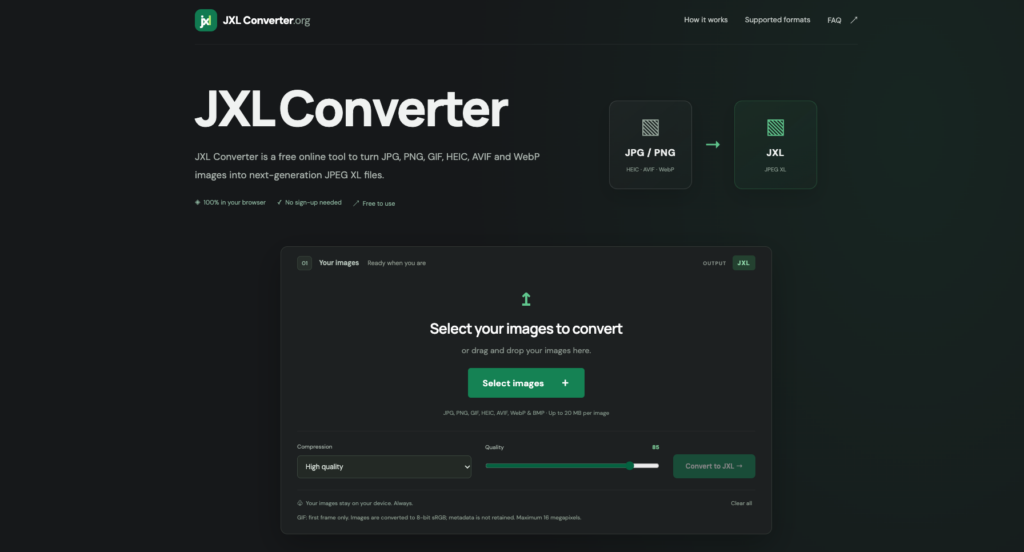
JXLConverter.org is the online tool to check for this workflow. Review its current interface for JPG input, JXL output, and any available conversion settings.
Before selecting files, check whether conversion happens locally or on a server, along with any file-size limits and retention policy. An online interface does not automatically mean your images stay on your device.
1. Prepare a Test Image
Choose a non-sensitive JPG that represents the images you normally use. Keep the original and note its file size and dimensions.
If your goal is exact JPEG reconstruction, avoid resizing or editing the source during conversion. Those operations change what you are preserving.
2. Select the Available Conversion Settings
Use the site's file-selection control and choose JPEG XL output if a format selection is offered. Review any quality, metadata, and compression options before proceeding.
If you need reversible recompression, look for an explicit description of that feature. When it is not documented, treat exact original-file recovery as unverified.
3. Convert and Download the Result
Run the conversion using the available controls and download the resulting file. Confirm that it is a valid JXL image by opening it in compatible software.
Keep the output separate from your original collection until you finish testing. This makes it easier to compare results and repeat the process with different settings.
4. Compare Quality and File Size
Compare both images at the same zoom level in a color-managed viewer. Check orientation, color, sharpness, and any metadata you need to retain.
Calculate the size reduction as (original size – converted size) / original size × 100. For example, a reduction from 1,000 KB to 800 KB is a 20% saving; this is an illustration, not a guaranteed result.
Convert JPG to JXL With the Free libjxl Tools
For a documented local workflow, the libjxl reference implementation includes command-line tools for JPEG XL. Install a package or build that includes the cjxl encoder and djxl decoder for your operating system.
The cjxl documentation states that JPEG input is losslessly recompressed by default, allowing bit-for-bit reconstruction. A basic conversion uses this command:
cjxl input.jpg output.jxlFor a JXL file containing the necessary JPEG reconstruction data, restore the JPEG with:
djxl output.jxl restored.jpgVerify that the restored file matches the original using a byte comparison or cryptographic file hashes. Matching appearance alone does not prove that the files are identical.
What to Check Before Publishing JXL Images
Confirm that your destination accepts JPEG XL and that your audience can view it. Check the JPEG XL software support list and test your actual browsers, applications, and devices.
For WordPress, test uploads, thumbnail creation, editing, and CDN delivery before changing your image workflow. Accepting a file extension is only one part of supporting an image format.
Retain a compatible fallback for web delivery where needed. You can also improve results by following our guide to reducing image file sizes rather than relying on format conversion alone.
Common JPG to JXL Conversion Mistakes
- Renaming the extension: A valid JXL file must be produced by an encoder.
- Assuming all lossless modes are reversible: Preserving decoded pixels is different from reconstructing the original JPEG.
- Deleting originals before verification: Test recovery, metadata, and compatibility first.
- Expecting missing detail to return: Conversion cannot recover information previously discarded by JPEG compression.
- Comparing only file sizes: A smaller result is useful only if its quality and compatibility meet your needs.
Frequently Asked Questions
Are JPG and JPEG Different Input Formats?
No. The extensions .jpg and .jpeg commonly identify the same image format.
Can I Convert JPG to JXL Without Losing Quality?
Yes, with an appropriate lossless conversion mode. For exact recovery of the original JPEG file, specifically use reversible JPEG recompression and verify the round trip.
Why Is My JXL File Larger?
The converter may have decoded the JPEG and stored its pixels losslessly rather than using JPEG recompression. Source characteristics, metadata, and encoder settings can also affect the result.
Can I Convert JXL Back to JPG?
Yes, with compatible software. Exact reconstruction requires preserved JPEG reconstruction data; otherwise, producing a JPG generally involves a new JPEG encoding.
Conclusion
Choose your JPG-to-JXL conversion method based on whether you need smaller delivery files, preserved pixels, or exact JPEG recovery. Explore JXLConverter.org for an online option, or use libjxl for a documented local workflow.
Keep the originals, inspect the converted images, and test the applications that will use them. A successful conversion preserves what matters while delivering a measurable benefit.

As one of the co-founders of Codeless, I bring to the table expertise in developing WordPress and web applications, as well as a track record of effectively managing hosting and servers. My passion for acquiring knowledge and my enthusiasm for constructing and testing novel technologies drive me to constantly innovate and improve.
Expertise:
Web Development,
Web Design,
Linux System Administration,
SEO
Experience:
15 years of experience in Web Development by developing and designing some of the most popular WordPress Themes like Specular, Tower, and Folie.
Education:
I have a degree in Engineering Physics and MSC in Material Science and Opto Electronics.
Comments