

- What Is a Text Anonymizer?
- What PII Should You Remove Before Using ChatGPT?
- Anonymization vs. Redaction vs. Pseudonymization
- How to Remove PII Manually Before Pasting Text into ChatGPT
- Before-and-After Example of PII Removal
- Use TextAnonymizer.com to Prepare Text Online
- An Open-Source Option for Technical Teams
- How to Keep Anonymized Text Useful for ChatGPT
- Common PII Removal Mistakes
- Frequently Asked Questions
- Conclusion
A text anonymizer helps you remove personally identifiable information (PII) before pasting content into ChatGPT. It replaces identifying details with placeholders so you can work with the text without unnecessarily sharing names, contact details, or account information.
This is useful when rewriting customer emails, summarizing meeting notes, or reviewing support conversations.
You can prepare the text manually or use a free browser-based tool such as TextAnonymizer.com, then review the result before sharing it.
What Is a Text Anonymizer?
A text anonymizer detects identifying information and removes, masks, or replaces it. For example, it might change a person's name to [PERSON_1] and an email address to [EMAIL_1].
Different tools support different types of information and languages. Some recognize patterns such as phone numbers, while others use language analysis to identify names and locations in context.
However, using a tool called an anonymizer does not automatically make a document anonymous. Details left in the text may still identify someone when combined.
What PII Should You Remove Before Using ChatGPT?
Start with information that identifies a person directly or connects the text to a specific account. Then check for background details that could reveal their identity indirectly.
- Personal details: Names, home addresses, dates of birth, email addresses, and phone numbers.
- Identification numbers: Passport numbers, national ID numbers, and driving licence numbers.
- Financial information: Bank account details and payment card numbers.
- Account references: Customer IDs, employee numbers, and identifiers linked to a person.
- Sensitive context: Health information, employment matters, or financial circumstances associated with an identifiable individual.
Also remove passwords, API keys, access tokens, and private links. These are not always PII, but they can expose accounts or confidential systems.
Anonymization vs. Redaction vs. Pseudonymization
Redaction removes information or replaces it with a label such as [REDACTED]. It works well when the original detail is unnecessary for the task.
Pseudonymization replaces identifying information with consistent substitutes such as [CUSTOMER_1]. A separate mapping or other contextual information may still connect the text to the original person.
Anonymization goes further by making people no longer identifiable, including through combinations of remaining details. Removing names alone does not establish that a document is anonymous.
How to Remove PII Manually Before Pasting Text into ChatGPT
1. Select Only the Text You Need
Copy the smallest section that supports your request. If you need help drafting a customer reply, you may not need the entire email conversation.
Remove signatures, quoted messages, private links, and unrelated background information. This reduces the amount of content you need to inspect.
2. Replace Direct Identifiers
Replace names, contact information, and account references with descriptive placeholders. Use the same placeholder whenever the same person or identifier appears.
For example, use [CUSTOMER_1] consistently for one customer and [CUSTOMER_2] for another. This preserves the relationship between people without including their names.
3. Generalize Identifying Context
A unique job title, precise location, and exact event date may identify someone even after their name is removed. Replace unnecessary specifics with broader descriptions such as “a manager,” “a regional office,” or “last month.”
Keep precise details only when they are necessary and appropriate to share. For a writing task, the sequence of events may matter more than their exact dates.
4. Review the Edited Version
Read the cleaned text as a complete message. Check whether someone could still be identified and whether enough context remains for ChatGPT to complete your task.
Keep any mapping between placeholders and real identities outside the prompt. Including that mapping would undo the replacement.
Before-and-After Example of PII Removal
The following example uses fictional details to show how you can preserve a writing task while removing identifying information.
Original text:
Please rewrite this reply to Maya Bennett at [email protected]. Her customer ID is C-48291, and she requested a refund of $89 after being charged twice on March 12.
Prepared for ChatGPT:
Please rewrite a reply to [CUSTOMER_1]. The customer requested a refund of [AMOUNT] after being charged twice on [DATE]. Acknowledge the issue and explain that we are reviewing the duplicate payment.
The revised prompt preserves the purpose of the request without including the customer's identity or account reference. You can add the correct details to the final reply after reviewing the AI's output.
Use TextAnonymizer.com to Prepare Text Online
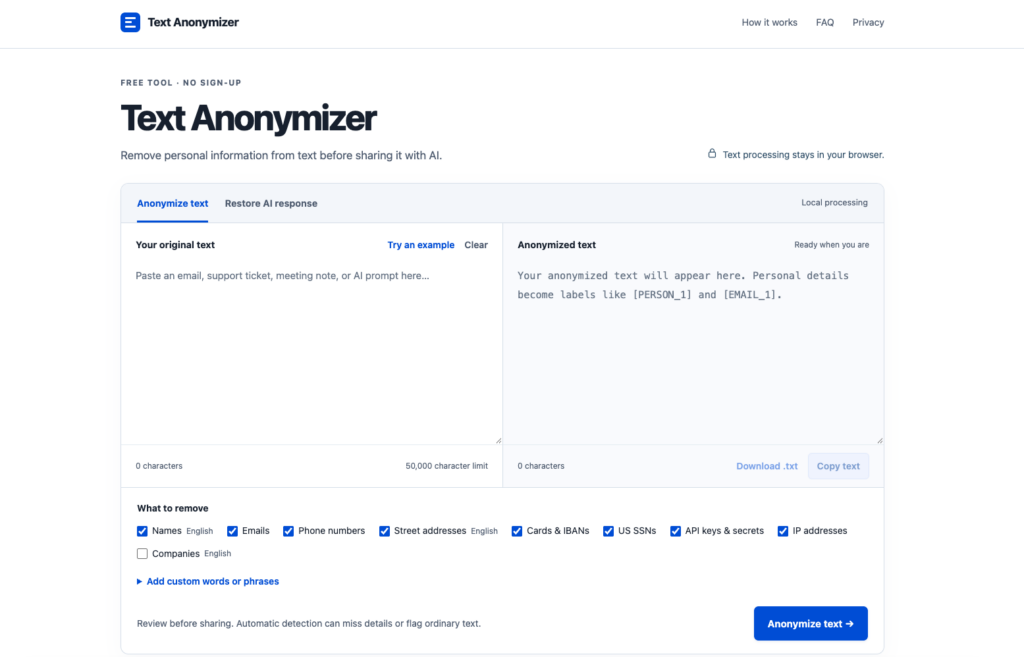
For a free option that works directly in your browser, try TextAnonymizer.com. It offers a convenient starting point for preparing text before using it in an AI prompt, without installing a desktop application.
Use the tool to anonymize your content, then review the output before copying it into ChatGPT. Pay particular attention to names, contact information, account references, and identifying details in the surrounding context.
How to Use the Text Anonymizer in Your Workflow
- Prepare your source text. Select only the content needed for your AI task.
- Open TextAnonymizer.com. Check its privacy information before entering sensitive material.
- Anonymize the text. Use the available controls to prepare a version with identifying details removed or replaced.
- Review the result. Correct missed details and confirm that placeholders preserve the meaning.
- Copy the reviewed version into ChatGPT. Add your instructions for rewriting, summarizing, or analyzing it.
Browser-based access does not automatically mean that processing happens entirely on your device. Check the tool's documentation to understand whether text is transmitted to a server and how it is handled.
An Open-Source Option for Technical Teams
For developers building a repeatable PII removal workflow, Microsoft Presidio is an open-source framework for detecting and de-identifying personal information. Its anonymizer supports operations such as replacing, redacting, and masking detected text.
Presidio requires technical setup, making it more suitable for custom applications and internal workflows. Detection coverage depends on its recognizers, languages, and configuration, so the results still need review.
How to Keep Anonymized Text Useful for ChatGPT
Preserve the relationships and facts needed for the task. Replacing every detail with the same [REDACTED] label can make a conversation difficult to follow.
Use meaningful placeholders such as [EMPLOYEE_1], [MANAGER_1], and [COMPANY_1]. Keep the sequence of events clear, even when exact dates or locations are removed.
You can add the following instruction above your cleaned text:
Rewrite the text below for clarity and a professional tone. Preserve all placeholders exactly as written, and do not invent names, contact details, or missing facts.
Common PII Removal Mistakes
Removing names but leaving identifying context: A rare job title, specific workplace, or unusual event can reveal who the text describes. Review the whole message rather than checking only individual fields.
Trusting automated detection without checking: Tools may miss unfamiliar names, unusual identifiers, or information written in an unsupported language. Review every output before sharing it.
Asking ChatGPT to redact the original sensitive text: This sends the content to the service before redaction happens. Prepare the text beforehand when your goal is to avoid sharing those details.
Frequently Asked Questions
What Is PII in a ChatGPT Prompt?
PII is information that identifies a person directly or can help identify them when combined with other details. In a prompt, this can include names, email addresses, customer identifiers, and identifying background information.
Can I Remove Personal Information for Free?
Yes. You can manually replace sensitive details in a text editor or use a free online option such as TextAnonymizer.com, then review the cleaned result.
Does Removing Names Make a Document Anonymous?
No. Locations, job titles, dates, and unusual circumstances may still identify someone when combined, so removing names is only one part of the process.
Do Browser-Based Anonymizers Always Process Text Locally?
No. A browser-based tool may still send content to a server, so check its privacy information and technical documentation before using it with sensitive text.
Can I Restore the Original Details After Rewriting?
Yes, if you kept a separate mapping between placeholders and original values. Restore those details in your own document and check that each replacement is correct.
Conclusion
A text anonymizer can help reduce the personal information included in AI prompts. Begin with the minimum necessary content, replace direct identifiers, and check the remaining context before pasting it into ChatGPT.
Manual editing works for short messages, while tools such as TextAnonymizer.com can help streamline the process. Review the final version to make sure it preserves the meaning without exposing unnecessary personal details.

As one of the co-founders of Codeless, I bring to the table expertise in developing WordPress and web applications, as well as a track record of effectively managing hosting and servers. My passion for acquiring knowledge and my enthusiasm for constructing and testing novel technologies drive me to constantly innovate and improve.
Expertise:
Web Development,
Web Design,
Linux System Administration,
SEO
Experience:
15 years of experience in Web Development by developing and designing some of the most popular WordPress Themes like Specular, Tower, and Folie.
Education:
I have a degree in Engineering Physics and MSC in Material Science and Opto Electronics.



Comments